
Introduction
Microsoft Word is one of the most widely used word processing tools in the world. From students writing assignments to professionals creating reports, Microsoft Word plays an important role in daily work. However, many people only use its basic features and never explore its full potential. This is where Microsoft Word Tips become extremely useful for beginners and intermediate users.
Learning Microsoft Word Tips can help you work faster, write better documents, and avoid common formatting problems. Instead of spending hours fixing layout issues, you can complete tasks in minutes with the right techniques. Microsoft Word Tips also improve accuracy and presentation, which is essential for academic and professional success.
For beginners, Microsoft Word can feel overwhelming because of its many options and tools. At the same time, intermediate users often repeat the same mistakes because they do not know smarter ways to work. Microsoft Word Tips bridge this gap by teaching simple, practical methods that anyone can follow.
In this guide, you will learn Microsoft Word Tips explained in simple English. Each section is designed to build your confidence step by step. You will understand what Microsoft Word is, why it is important, and how to use its features efficiently. The goal is to help you save time, reduce stress, and create professional-looking documents with ease.
Whether you are a student, office worker, freelancer, or business owner, these Microsoft Word Tips will help you improve your productivity and document quality. Let us begin by understanding what Microsoft Word actually is and why it matters so much today.
What is Microsoft Word?
Microsoft Word is a word processing software developed by Microsoft. It allows users to create, edit, format, and print text-based documents easily. It is part of the Microsoft Office suite and is available on Windows, macOS, and mobile devices.
At its core, Microsoft Word is used for writing letters, reports, resumes, essays, and many other documents. However, it offers much more than simple typing. With the help of Microsoft Word Tips, users can format text professionally, insert images, create tables, and manage long documents efficiently.
Microsoft Word includes tools for spell checking, grammar correction, page layout design, and collaboration. These features make it suitable for both personal and professional use. Beginners often start with basic typing, while advanced users use styles, templates, and automation features.
Understanding Microsoft Word is the first step toward mastering Microsoft Word Tips. Once you know what the software can do, you can start using its tools more effectively. This knowledge helps you create documents that look clean, organized, and professional.
Why is Microsoft Word Important?

Microsoft Word is important because it simplifies document creation and management. In education, it is used for assignments, projects, and research papers. In offices, it is essential for reports, proposals, and official letters. Microsoft Word Tips help users get the most out of this powerful tool.
One major reason for its importance is compatibility. Microsoft Word documents are widely accepted and easy to share. Almost everyone can open and read a Word file, which makes communication smooth and reliable.
Another reason is efficiency. With the right Microsoft Word Tips, you can automate repetitive tasks, use templates, and apply formatting consistently. This saves time and reduces errors in documents.
Microsoft Word also supports collaboration. Multiple users can edit the same document, add comments, and track changes. This feature is extremely useful for teams and group projects.
Finally, Microsoft Word improves presentation. Well-formatted documents create a positive impression. Whether you are submitting an assignment or sending a business proposal, Microsoft Word Tips help you present your ideas clearly and professionally.
Detailed Step-by-Step Guide
Getting Started with the Interface
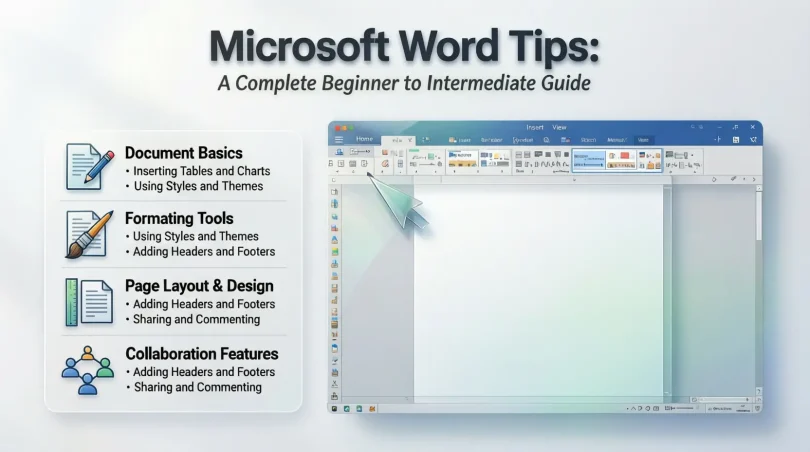
When you open Microsoft Word, you see the Ribbon at the top. The Ribbon contains tabs such as Home, Insert, Layout, and Review. Each tab has tools related to specific tasks.
One of the most useful Microsoft Word Tips is to learn where tools are located. This reduces confusion and speeds up your work. Spend some time exploring each tab to understand its purpose.
The Quick Access Toolbar is another helpful feature. You can customize it to include frequently used commands. This simple step can save a lot of time during daily work.
Formatting Text Properly
Text formatting is one of the most common tasks in Microsoft Word. This includes changing font size, style, color, and alignment. Using Microsoft Word Tips, you can format text consistently throughout your document.
Instead of manually formatting each heading, use built-in Styles. Styles ensure uniform formatting and make your document look professional. They also help in creating automatic tables of contents.
Line spacing and paragraph spacing are also important. Proper spacing improves readability and makes your document look clean. Avoid pressing the Enter key multiple times to create space.
Working with Paragraphs and Alignment
Paragraph alignment affects how your text appears on the page. Microsoft Word offers left, right, center, and justified alignment. Choosing the right alignment depends on the type of document.
Indentation is another useful feature. It helps organize content and highlight important sections. Microsoft Word Tips recommend using the ruler or paragraph settings instead of spaces.
Bullet points and numbered lists are excellent for presenting information clearly. They make content easier to read and understand, especially in guides and reports.
Using Tables Effectively
Tables help organize data in rows and columns. They are useful for schedules, comparisons, and structured information. Microsoft Word Tips suggest using tables instead of tabs or spaces.
You can customize tables by adjusting borders, shading, and alignment. This improves clarity and visual appeal. Tables can also be converted into text if needed.
Sorting data inside tables is another helpful feature. It allows you to arrange information alphabetically or numerically with just a few clicks.
Inserting Images and Media
Images make documents more engaging and informative. Microsoft Word allows you to insert pictures, shapes, and icons. Microsoft Word Tips recommend resizing images properly to maintain quality.
Text wrapping options control how text flows around images. Choosing the right wrap style improves layout and readability. Avoid placing images randomly without alignment.
You can also add captions to images. This is especially useful for academic and technical documents where explanation is required.
Page Layout and Design
Page layout determines how your document looks when printed or shared. Margins, orientation, and page size should be set correctly from the start.
Headers and footers add professionalism. They can include page numbers, document titles, or author names. Microsoft Word Tips suggest using these features instead of typing information manually on each page.
Section breaks allow different formatting within the same document. This is useful for long documents with multiple layouts.
Benefits of Microsoft Word Tips
- Improve productivity and save time
- Create professional and polished documents
- Reduce formatting errors and mistakes
- Enhance readability and presentation
- Simplify collaboration and editing
- Increase confidence in document creation
Disadvantages / Risks
- Over-formatting can make documents look cluttered
- Too many fonts and colors reduce readability
- Ignoring styles leads to inconsistent formatting
- Large files may slow down performance
- Lack of backups can cause data loss
Common Mistakes to Avoid
Many users rely on manual formatting instead of styles. This creates inconsistency and wastes time. One of the key Microsoft Word Tips is to use styles for headings and body text.
Another mistake is using spaces or tabs for alignment. This causes layout issues, especially when documents are shared. Always use proper alignment tools.
Not saving work regularly is also risky. Enable auto-save or save your document frequently to avoid losing data.
Ignoring spell check and grammar tools can reduce document quality. These built-in tools help catch errors quickly.
Finally, beginners often forget to preview documents before printing or sharing. Previewing helps identify layout issues early.
FAQs
What are the best Microsoft Word Tips for beginners?
Beginners should focus on learning the Ribbon, using styles, and understanding basic formatting. These Microsoft Word Tips build a strong foundation.
How can Microsoft Word Tips save time?
Microsoft Word Tips help automate tasks, use templates, and apply consistent formatting. This reduces manual work and speeds up document creation.
Are Microsoft Word Tips useful for students?
Yes, students benefit greatly from Microsoft Word Tips. They help create neat assignments, proper formatting, and error-free documents.
Can Microsoft Word be used for professional documents?
Microsoft Word is widely used for professional documents. With the right Microsoft Word Tips, you can create reports, proposals, and resumes easily.
How do styles help in Microsoft Word?
Styles apply consistent formatting and help organize content. They also make it easier to create tables of contents.
Is Microsoft Word difficult to learn?
Microsoft Word is easy to learn with practice. Following simple Microsoft Word Tips makes the learning process smooth and stress-free.
Expert Tips & Bonus Points
One expert tip is to use keyboard shortcuts. Shortcuts speed up tasks like copying, pasting, and formatting text.
Another bonus tip is to use templates. Templates save time and ensure a professional layout from the start.
Track Changes is a powerful feature for editing and collaboration. It allows you to review changes without losing original content.
Using cloud storage ensures your documents are safe and accessible from anywhere. This also supports real-time collaboration.
Finally, always keep your software updated. Updates improve performance and add new features that enhance productivity.
Conclusion
Microsoft Word is more than just a typing tool. It is a powerful platform that helps users create, manage, and share documents effectively. By learning Microsoft Word Tips, beginners and intermediate users can unlock its full potential and work more confidently.
These Microsoft Word Tips help improve speed, accuracy, and presentation. They reduce common mistakes and make document creation stress-free. From formatting text to designing layouts, each tip adds value to your skills.
With regular practice, these Microsoft Word Tips become habits. Over time, you will notice a significant improvement in the quality of your documents. Your work will look professional, organized, and easy to read.
Whether you are writing for school, work, or personal use, mastering Microsoft Word Tips is a smart investment. Start applying these tips today and experience the difference in your productivity and document quality.