
Introduction
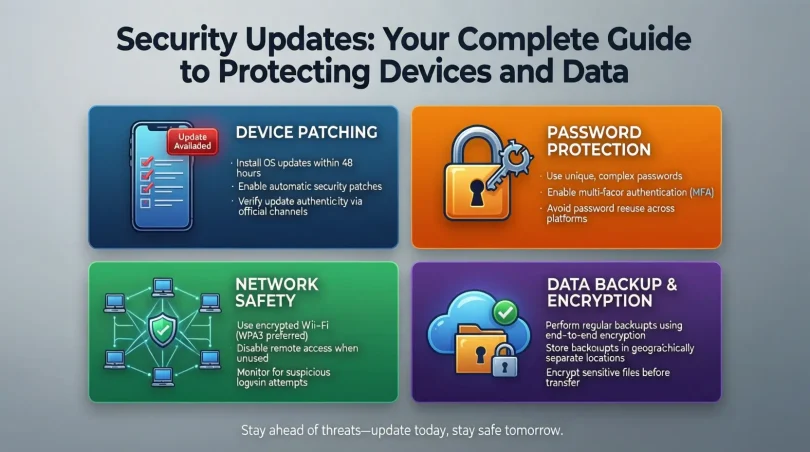
In today’s digital world, protecting your devices and personal data is more important than ever. Every day, cyber threats evolve, and hackers find new ways to exploit vulnerabilities in software. This is where security updates become essential. A security update is a piece of software released by developers to fix security vulnerabilities, improve system defenses, and keep your data safe. Without these updates, your devices are exposed to malware, ransomware, and other cyberattacks that can compromise your privacy and financial information.
Many users ignore security updates, often due to fear of interruptions or because they underestimate the risks. However, skipping updates can leave your computer, smartphone, or network extremely vulnerable. Security updates not only patch vulnerabilities but also enhance the performance of your device and ensure it runs smoothly. Regularly installing updates is a simple yet highly effective step in maintaining digital security.
In this guide, we will cover everything you need to know about security updates. We will explain what they are, why they are crucial, and provide a detailed step-by-step guide on how to install them. We will also discuss their benefits, potential risks, common mistakes, and share expert tips for maximum protection. Whether you are a beginner or have intermediate knowledge, this article will equip you with practical advice to keep your devices and data secure. By the end, you will understand why security updates are not just optional—they are essential for anyone using digital devices today.
What is Security Updates?
A security update is a software patch released by developers to fix security vulnerabilities in an operating system, application, or device firmware. These updates are specifically designed to protect your device against known threats, such as malware, viruses, or unauthorized access.
Software developers continually identify weaknesses in their programs. Once a vulnerability is discovered, they create a security update to address it. These updates can range from small patches to major upgrades, depending on the severity of the vulnerability.
Security updates are not just limited to computers. Smartphones, tablets, routers, smart home devices, and even IoT devices rely on regular updates to stay secure. For instance, without updates, a smart camera could be hacked to access your private footage.
Key points about security updates:
- They fix vulnerabilities that could be exploited by cybercriminals.
- They improve the overall stability and performance of devices.
- They are released regularly by software developers and manufacturers.
- Ignoring them increases the risk of cyberattacks.
By understanding what security updates are, users can appreciate why they are crucial in protecting both personal and professional data.
Security updates are not just technical measures; they are critical for safeguarding your digital life. Here are the main reasons why security updates are so important:
- Protect Against Cyber Threats
Cybercriminals are always looking for software vulnerabilities to exploit. Without updates, your system becomes an easy target. Installing updates ensures that known security gaps are patched. - Prevent Data Breaches
Sensitive data, including passwords, bank details, and personal information, can be stolen if devices are not updated. Security updates prevent unauthorized access and keep your information private. - Improve Device Performance
Many updates also enhance system performance. By fixing bugs and optimizing software, updates ensure that your device runs smoothly. - Compliance and Legal Requirements
Organizations must follow cybersecurity regulations, which often require devices to be updated regularly. Failure to do so can lead to penalties or legal issues. - Protect Networks and Connected Devices
In modern homes and offices, devices are interconnected. If one device is vulnerable, it can compromise the entire network. Regular security updates help maintain the safety of all connected devices. - Future-proofing Against New Threats
Hackers continuously develop new techniques. Security updates include protections against emerging threats, ensuring your devices remain safe in the long term.
Without security updates, you risk not only data loss but also financial and reputational damage. Whether you are using a personal device or managing a business network, updates are essential to staying secure.
Detailed Step-by-Step Guide to Security Updates

Keeping your devices safe requires a proactive approach. Here’s a detailed guide on how to manage and install security updates across different platforms.
1. Update Your Operating System
Windows:
- Click the Start menu and open Settings.
- Go to “Update & Security.”
- Click “Check for updates.”
- Install all available updates, including optional security updates.
- Restart your computer if required.
MacOS:
- Open System Preferences.
- Select “Software Update.”
- Click “Update Now” to install available updates.
- Enable automatic updates for convenience.
Linux:
- Open the terminal.
- Use your package manager, e.g.,
sudo apt update && sudo apt upgrade. - Follow prompts to install updates.
- Reboot if necessary.
2. Update Mobile Devices
Android:
- Open Settings > System > Advanced > System update.
- Check for updates and download the latest version.
- Restart your device if prompted.
iOS (iPhone/iPad):
- Open Settings > General > Software Update.
- Tap “Download and Install” if an update is available.
- Ensure your device is connected to Wi-Fi and charged.
3. Update Software Applications
- Open the application and check for updates in the menu (often under “Help” or “About”).
- Enable automatic updates whenever possible.
- For browsers, such as Chrome or Firefox, updates happen automatically, but you should check periodically.
4. Update Firmware for Devices
Smart devices like routers, cameras, and IoT gadgets often require firmware updates:
- Log in to the device’s admin panel.
- Navigate to the firmware or system update section.
- Download and install updates following manufacturer instructions.
- Regularly check for updates, as manufacturers release patches to fix vulnerabilities.
5. Automate Security Updates
Most modern systems allow automatic updates:
- Windows: Settings > Update & Security > Advanced options > Turn on automatic updates.
- Mac: System Preferences > Software Update > Automatically keep my Mac up to date.
- Mobile: Enable auto-update in device settings or app stores.
Automating updates ensures you are always protected without having to remember manual checks.
Benefits of Security Updates
Installing security updates offers multiple advantages:
- Enhanced Security: Fixes vulnerabilities and prevents cyberattacks.
- Better Performance: Improves speed and stability of devices.
- Data Protection: Keeps sensitive information safe from hackers.
- Regulatory Compliance: Helps organizations meet cybersecurity standards.
- Reduced Risk of Downtime: Prevents malware that could disrupt operations.
- Peace of Mind: Knowing your devices are protected reduces stress and worry.
Security updates are an easy and effective way to maintain both personal and professional digital safety.
Disadvantages / Risks
While security updates are mostly beneficial, there are a few considerations:
- Temporary Compatibility Issues: Some updates may conflict with older software.
- Unexpected Bugs: Occasionally, updates can introduce new minor issues.
- Storage and Bandwidth Usage: Large updates can consume significant space and data.
- Interruptions: Updates may require restarting devices, which can disrupt work.
Despite these minor risks, the benefits of installing updates far outweigh potential drawbacks. Regularly backing up your device can mitigate most problems.
Common Mistakes to Avoid
- Ignoring Updates: Skipping updates leaves devices vulnerable.
- Delaying Updates: Waiting too long increases the risk of attacks.
- Disabling Automatic Updates: Makes it easy to forget important security patches.
- Installing Unverified Updates: Only use updates from official sources.
- Not Updating All Devices: Even a single vulnerable device can compromise a network.
- Failing to Restart Devices: Some updates require a restart to take effect fully.
Avoiding these mistakes ensures that your devices remain secure and fully functional.
FAQs About Security Updates
1. How often should I install security updates?
You should install updates as soon as they are available. Enabling automatic updates ensures you never miss critical patches.
2. Are security updates only for computers?
No, security updates apply to smartphones, tablets, routers, smart home devices, and IoT gadgets. All connected devices need regular updates.
3. Can updates slow down my device?
Generally, updates improve performance. Rarely, a specific update may cause temporary issues, but these are often fixed quickly with follow-up patches.
4. Do security updates remove viruses?
No, security updates prevent vulnerabilities from being exploited. If a device is already infected, antivirus software or specialized tools are needed.
5. Can I ignore minor updates?
Even minor updates often include important security patches. Ignoring them can leave your system exposed.
6. What happens if I uninstall a security update?
Uninstalling a security update reopens vulnerabilities. It is not recommended unless necessary for compatibility issues, and you should install a fixed version soon after.
7. Are free updates safe?
Yes, official updates from software developers or device manufacturers are safe. Avoid third-party updates from unverified sources.
8. Should I back up before updating?
Yes, backing up data is a good practice. In rare cases, an update may fail, and a backup ensures no data is lost.
Expert Tips & Bonus Points
- Enable Automatic Updates: This is the simplest way to stay secure.
- Update Immediately After Release: Hackers often exploit vulnerabilities soon after updates are announced.
- Use Reliable Antivirus Software: Complement updates with strong antivirus protection.
- Check for Firmware Updates Regularly: Smart devices are often overlooked but vulnerable.
- Back Up Data Frequently: Protect your data before major updates.
- Educate Family and Team Members: Ensure everyone understands the importance of updates.
- Monitor Update Logs: Some updates may introduce new features or changes that require attention.
Following these tips ensures comprehensive protection and minimizes security risks.
Conclusion
Security updates are an essential part of maintaining digital safety in today’s technology-driven world. They protect against cyber threats, secure sensitive information, and enhance the performance of devices. Skipping updates may seem harmless, but it exposes devices to malware, hacking attempts, and data breaches.
By following a consistent update routine, automating updates, and being aware of common mistakes, both beginners and intermediate users can significantly reduce the risk of cyberattacks. Security updates are not just a technical necessity—they are a fundamental part of digital hygiene. With proper attention, you can enjoy a safer online experience, protect your data, and ensure your devices run efficiently for years to come. Remember, staying updated is staying secure.