
Introduction
Productivity software has become an essential part of modern work life. Whether you are a student, a freelancer, a small business owner, or an office employee, you deal with tasks, deadlines, emails, and information every day. Managing all these things without the right tools can feel stressful and overwhelming. That is where productivity software makes a real difference. It helps people organize their work, save time, and focus on what truly matters.
In simple words, productivity software is designed to help you do more in less time without feeling exhausted. It supports better planning, clearer communication, and smoother workflows. Instead of juggling multiple notebooks, reminders, and files, you can bring everything into one organized system. As a result, your work becomes more structured and less confusing.
Another reason productivity software is so popular is flexibility. Many tools work on computers, tablets, and mobile phones. This means you can continue your work from anywhere without losing progress. For beginners, these tools are easy to learn and use. For intermediate users, they offer advanced features that improve efficiency even more.
In today’s fast-paced world, working hard is not enough. Working smart is what truly matters. Productivity software supports this mindset by helping you set goals, track progress, and reduce wasted effort. In this guide, you will learn what productivity software is, why it is important, how to use it step by step, and how to avoid common mistakes. By the end, you will clearly understand how these tools can improve your daily work life.
What Is Productivity Software?
Productivity software refers to digital tools and applications created to help individuals and teams complete tasks more efficiently. These tools focus on improving time management, organization, communication, and overall workflow. Instead of doing everything manually, productivity software automates and simplifies daily activities.
This type of software comes in many forms. Some tools help you manage tasks and projects. Others focus on note-taking, scheduling, document creation, or team collaboration. Although each tool has a different purpose, the main goal remains the same: to increase efficiency and reduce unnecessary effort.
Productivity software is used in offices, schools, and even at home. Students use it to manage assignments. Professionals use it to plan projects and meetings. Businesses use it to coordinate teams and track performance. Because of this wide usage, productivity software has become a basic requirement rather than a luxury.
Most productivity software is designed with user-friendly interfaces. This makes it easy for beginners to start using it without technical knowledge. At the same time, advanced features are available for users who want deeper control over their work processes.
Why Is Productivity Software Important?

Productivity software is important because it helps people make better use of their time and energy. Without proper tools, it is easy to forget tasks, miss deadlines, or feel mentally overloaded. These tools create structure and clarity in daily work routines.
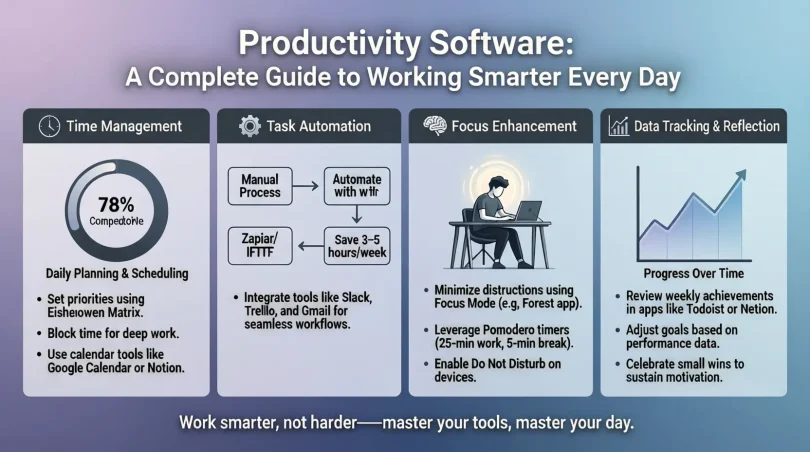
One major benefit is improved focus. When tasks are clearly listed and scheduled, your mind feels less cluttered. You know exactly what needs to be done and when. This reduces stress and increases confidence in your work.
Productivity software also supports better planning. You can break large projects into smaller steps and track progress over time. This makes complex work feel more manageable. In team environments, it improves communication and transparency. Everyone knows their role and responsibilities.
Another important reason is consistency. Good tools help you build productive habits. When you regularly plan, review, and adjust your tasks, your performance improves naturally. Over time, this leads to better results and personal growth.
Detailed Step-by-Step Guide
Step 1: Identify Your Needs
Before choosing productivity software, clearly understand your needs. Think about your daily tasks and challenges. Are you struggling with time management, organization, or collaboration? Identifying problems helps you choose the right tool.
Make a simple list of tasks you perform regularly. This could include writing, scheduling, meetings, or tracking goals. Once you know your requirements, selecting suitable productivity software becomes easier and more effective.
Step 2: Choose the Right Type of Tool
Productivity software comes in different categories. Task managers help track to-do lists. Project management tools handle complex workflows. Note-taking apps store ideas and information. Calendar tools manage schedules and deadlines.
Choose tools that match your goals. Beginners should start with simple tools. Intermediate users can explore advanced features. Avoid choosing too many tools at once, as this can cause confusion.
Step 3: Set Up Your Workspace
After selecting productivity software, take time to set it up properly. Customize categories, labels, and folders based on your workflow. A clean setup improves usability and saves time later.
Import existing tasks or notes if possible. This creates continuity and prevents loss of information. A well-organized workspace makes daily work smoother and more enjoyable.
Step 4: Create Clear Tasks and Goals
Clear tasks are the foundation of productivity software. Write tasks with specific actions and deadlines. Instead of vague goals, use clear descriptions that guide action.
Break large tasks into smaller steps. This makes progress visible and keeps motivation high. Set realistic deadlines to avoid unnecessary pressure.
Step 5: Use Scheduling and Reminders
Scheduling is a powerful feature of productivity software. Assign dates and times to tasks. Use reminders to stay on track without constantly checking your list.
This step improves time awareness and reduces last-minute stress. Over time, scheduling becomes a habit that improves overall productivity.
Step 6: Track Progress Regularly
Tracking progress helps you understand what is working and what needs improvement. Many productivity software tools offer visual progress indicators. Use these to review completed and pending tasks.
Regular reviews help you adjust plans and improve efficiency. This habit builds long-term productivity skills.
Step 7: Collaborate When Needed
If you work in a team, use collaboration features. Share tasks, updates, and feedback within the software. This reduces emails and misunderstandings.
Clear communication improves teamwork and accountability. Everyone stays aligned with shared goals.
Benefits of Productivity Software
- Improves time management and scheduling
- Reduces stress by organizing tasks clearly
- Increases focus and concentration
- Enhances teamwork and collaboration
- Helps track progress and performance
- Supports better decision-making
- Encourages productive habits
- Saves time through automation
Disadvantages / Risks
- Too many features can feel overwhelming
- Over-reliance may reduce flexibility
- Poor setup can cause confusion
- Notifications may become distracting
- Learning curve for advanced tools
- Data organization requires consistency
Common Mistakes to Avoid
One common mistake is using too many tools at the same time. This splits attention and reduces effectiveness. Choose a few tools that cover your main needs.
Another mistake is not updating tasks regularly. Outdated lists reduce trust in the system. Make it a habit to review and adjust tasks daily or weekly.
Ignoring training or tutorials is also a problem. Spending a little time learning features can greatly improve results. Finally, avoid setting unrealistic goals. Productivity software works best with achievable plans.
FAQs
What is productivity software used for?
Productivity software is used to manage tasks, time, projects, and communication. It helps individuals and teams work more efficiently and stay organized.
Is productivity software suitable for beginners?
Yes, many productivity software tools are designed for beginners. They offer simple interfaces and basic features that are easy to learn and use.
Can productivity software improve focus?
Productivity software improves focus by organizing tasks and reducing mental clutter. Clear plans make it easier to concentrate on one task at a time.
Do small businesses need productivity software?
Small businesses benefit greatly from productivity software. It helps manage tasks, teams, and deadlines without needing complex systems.
How much time does it take to learn productivity software?
Basic features can be learned quickly, often within a few hours. Advanced features may take longer but offer greater benefits.
Can productivity software be used for personal life?
Yes, productivity software is useful for personal goals, daily routines, and habit tracking. It supports better balance and organization.
Expert Tips & Bonus Points
Start simple and expand gradually. Focus on consistency rather than perfection. Review your system weekly to keep it relevant. Use templates to save time. Keep task descriptions clear and short. Avoid overloading your schedule. Finally, treat productivity software as a support tool, not a strict controller.
Conclusion
Productivity software plays a powerful role in helping people work smarter, not harder. In a world full of distractions and constant demands, having a clear system for managing tasks and time is essential. These tools provide structure, clarity, and control over daily activities. When used correctly, productivity software reduces stress and increases confidence in your work.
For beginners, productivity software offers an easy way to build good habits and stay organized. For intermediate users, it unlocks advanced features that improve efficiency and collaboration. The key is choosing the right tool, setting it up properly, and using it consistently. Productivity software is not about doing more work. It is about doing the right work in a better way.
By avoiding common mistakes and focusing on realistic goals, anyone can benefit from these tools. Over time, productivity software helps you understand your working style and improve it. It encourages planning, reflection, and continuous improvement. This leads to better results and a healthier work-life balance.
In the end, productivity software is a long-term investment in yourself. It supports growth, focus, and success in both professional and personal life. When used thoughtfully, it becomes a reliable partner in achieving your goals and managing your time with confidence.